Benchmarks
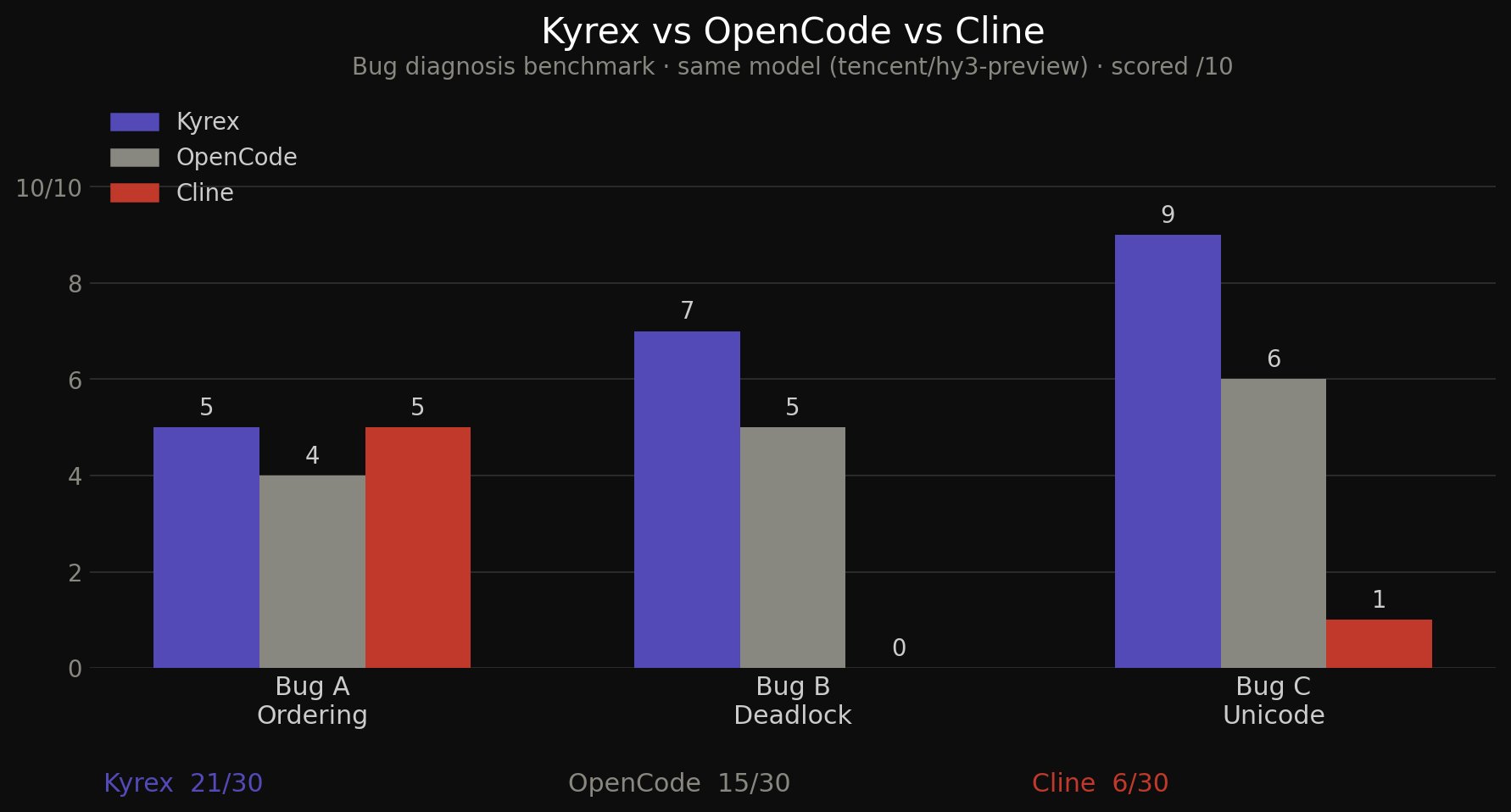
Kyrex vs leading coding agents — head-to-head performance on real coding tasks.
Kyrex is designed like network infrastructure — one control plane, many interfaces. Every surface inherits the same verification core.
TUI · Linux & WSL2
Available nowExtension
Available nowStandalone desktop
Coming soonWatch how Kyrex handles real-world development tasks with precision and safety.
Every feature explained visually. No reading required.
AST gating rejects broken code before it touches disk. Diff gating requires explicit approval. Dangerous commands are hard-blocked.
Branch your conversation context like Git. Fork experiments, checkout previous states, undo mistakes. Every path saved as portable JSON.
Thread-safe auditing maps exactly why the model executed specific tools. Persistent reasoning logs anchored to each interaction.
Toggle between Plan (read-only advisory) and Execute (autonomous code writing). Context compaction at 80% token threshold.
Slash-command autocomplete (/), inline model browser (/model), and full setup wizard (/setup). Ctrl+Y to copy last response.
Built-in hooks for Model Context Protocol. Pull in external tools, infrastructure tracking, or search APIs.
After 3 consecutive tool failures, Kyrex aborts to prevent infinite reasoning loops. Maximum 10 nested tool-call rounds.
Fire the same task at multiple models in parallel. Compare diffs side-by-side, merge the best result. Max 4 lanes — no prompt engineering needed.
Summon 1–2 helper models mid-session for a focused second opinion without derailing the main conversation.
Every session operates on a copy-on-write clone. File edits are isolated until you approve them — if the agent goes rogue, nothing hits your project tree.
Live visual trace of every phase — Plan → Execute → each tool call. Status icons, timing, and a full mission summary. No black box.
Ring-buffer history of every tool invocation with timing and result status. See what the agent did, how long it took, and whether it succeeded.
No changes land silently. Every file modification is staged and requires explicit human approval.
For high-confidence workflows. Auto-accept edits after a brief review window.
Set in-terminal: /autoapprove — or /autoapprove 5 for a custom delay.
Bring your own API key. Works with any OpenAI-compatible endpoint.
GPT-5, o-series reasoning
Claude Opus/Sonnet 4.x
Any OpenAI-compatible API
Your API keys, your models, your infrastructure. No vendor lock-in.
Use your own API keys directly. No middleman, no markup, no data collection.
Switch between GPT-4o, Claude, or any OpenAI-compatible endpoint on the fly.
Runs entirely on your machine. Sessions stored locally as portable JSON.
Point to Azure OpenAI, local LLMs, or any compatible API with custom base URLs.
Kyrex vs leading coding agents — head-to-head performance on real coding tasks.
One command. Linux/WSL — macOS port in progress.
curl -fsSL https://raw.githubusercontent.com/kp84-hub/kyrex/main/install.sh | bash
Then run the interactive setup wizard to configure your provider and model:
kx --setup
Or install manually:
# Clone and install

git clone https://github.com/kp84-hub/kyrex.git

cd kyrex

pip install -e kyrex_engine/ --break-system-packages

go build -o kx .

sudo cp kx /usr/local/bin/kx


# Configure and launch

kx --setup

kx
Requirements: Go 1.21+, Python 3.11+